The River Went Black
Every blade of grass, a third of the way to straw
The grass in Second Chance had been the wrong colour for as long as anyone had looked at it. Not dramatically wrong - olive, dusty, a shade that would be right for the end of August and is not right for a Midlands riverbank the rest of the year. James had a set of reference photographs of English grass and the game did not match them.
The agent - Claude Code Opus 5, which does most of the driving here - went looking for what set the colour, and found a scalar called GrassDryness running from 0 for lush rain-fed green to 1 for late-August straw. The build script that created the grass material carried a comment beside it saying the weather manager drove the value.
The weather manager does not drive the value. Read out of the graph rather than taken on trust, the weather tick writes exactly three things - rain intensity, wind speed and snow accumulation - and nothing anywhere in the project writes GrassDryness at all. So the number the player sees is the asset default, permanently, in every season and every weather. The default was 0.35. Every blade of grass in the game had been a third of the way to straw since the day it was authored.
The corroboration came free and was better than the first finding. The golf-course capture script sets the value by hand and puts it back afterwards, which is not something you write if anything else is driving it.
It went to 0.12. That is a one-constant change to a default and it fixes what is on screen; it does not build the missing seasonal response, and the entry for that is still open. There is a second one of these already on the list - eight wind parameter collections that nothing writes to either. A comment in a build script saying X drives this is now treated as unverified until somebody reads the graph.
Three millimetres, then twenty-three metres
The cat was a better problem, and it had been going for a fortnight.
Second Chance swapped its hand-made Blender cat for a bought rig back in August. In the editor viewport it looked right - correct size, correct coat, walking about. In the game it was not there. Not fallen through the floor, not streamed out, not hidden: a census had the actor present and moving. It simply did not draw.
Hours went into measuring it, and the measurements contradicted each other. Some cats read 22 to 32 centimetres. Others read three millimetres. The same cat read differently between calls.
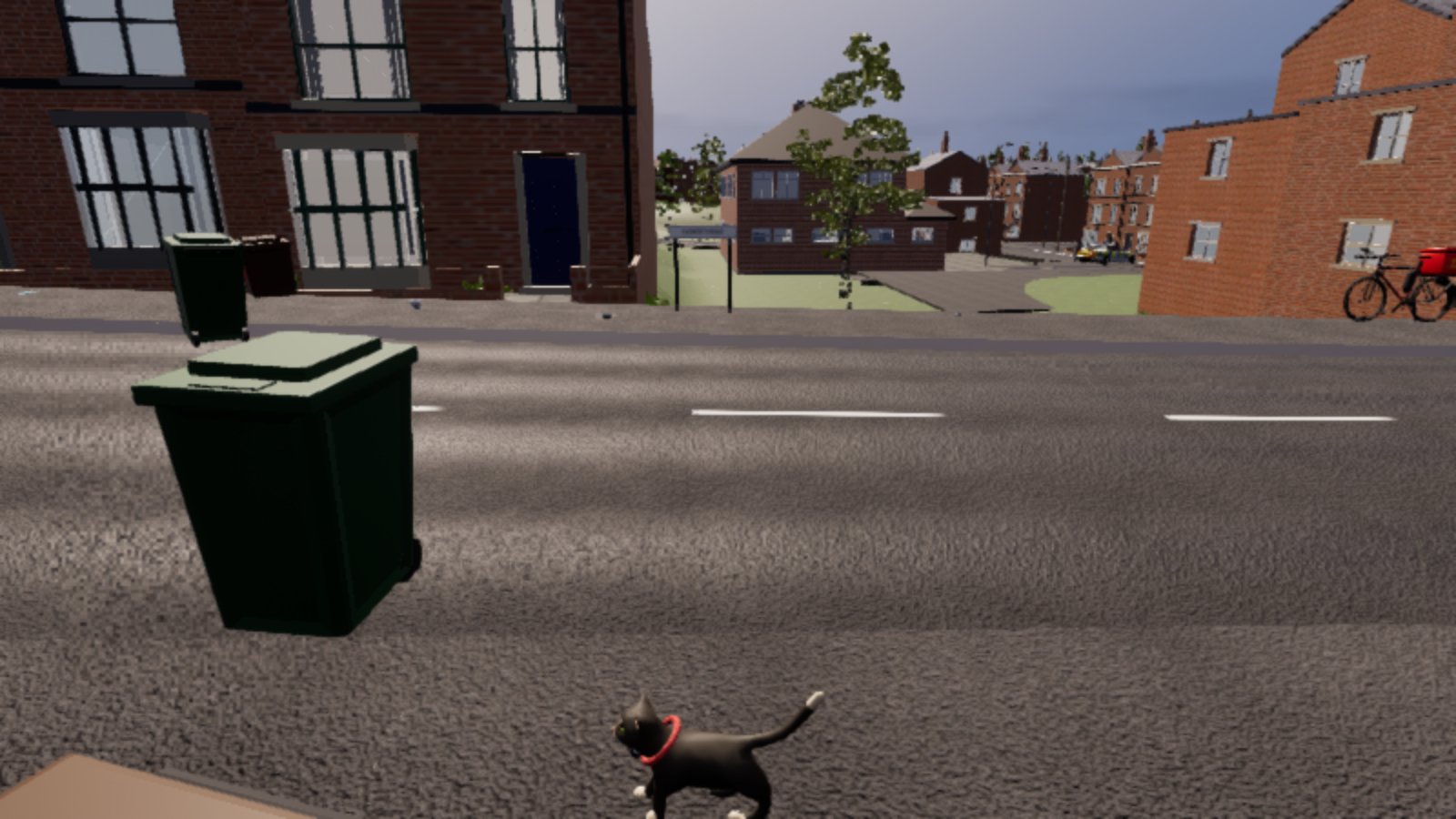
The reason is worth the whole afternoon it cost. Skeletal meshes in Unreal have a tick option called ONLY_TICK_POSE_WHEN_RENDERED, and it does what it says: a mesh nobody can see does not evaluate its pose. So every socket position and every bounds figure read off a cat that was not rendering came back stale or degenerate - and it came back looking exactly like data. The instrument was reporting the symptom it was being used to diagnose.
Once the live components were forced to tick their poses regardless, all eight cats became measurable at once, and the fault turned out to be two faults that fail differently on their own.
The first was bone translation retargeting, set to Animation on all 33 bones of the new skeleton where it needed to be Skeleton. That means the bone translations came through verbatim from clips authored against the old cat's proportions, and the hierarchy folded up: head and back foot three millimetres apart. A sub-centimetre sliver of cat, drawn correctly, at a size no camera would ever resolve.
The second was scale. The bought mesh is authored in metres, so its top bone carries a scale of 100 in the reference pose, and the retarget had baked a 1 onto it in all eleven clips. The instant a clip played, the cat dropped to a hundredth of its size.
The agent found the scale half first, fixed it, and produced a twenty-three-metre cat. The actor bounds came back 1,089 by 171 by 2,335 centimetres and a camera four metres away rendered nothing at all, because it was inside the animal. That got reverted the same hour, and the revert was the right call on the evidence and the wrong conclusion - the scale fix was correct, it was just being applied on top of translations that were still wrong. Fix both and the cat is 39.5 centimetres and walking down Radworth Road with its collar on straight.
Rockstar have people who do nothing but character rigs. He had a Thursday evening.
Straight down at the water
Then the river, which took the rest of the night.
The Oakhaven is a Midlands river and it was rendering near-black. Not blue, not brown - black, with a hard bright sun glare sitting on top of it. The water body carries two parameters that are supposed to decide what colour it is, Absorption and Scattering, and every attempt to change either of them did nothing.
The test that ought to have settled it was this: Scattering pushed to (2.0, 0.02, 0.02, 4.0), which is a single-scattering albedo of 0.98 on red. Water that scatters 98 per cent of the red light hitting it is a glass of tomato juice. The frame moved by one unit. The same values pushed straight onto the live material instance, bypassing everything upstream of it, moved it by nothing.
The reason those tests were worthless is the most useful thing in this entry, and it is not about water parameters at all. It is about where the camera was.
Water gets more mirror-like the more side-on you look at it. Look down into a pond and you see the bottom; look along it and you see the sky. That is Fresnel, and at a grazing angle a water surface reflects almost everything. The eye-height view along the river - the natural one, the one a player walking the bank actually gets - is a grazing view. It is very nearly a pure mirror, and it is almost blind to whatever colour the water itself has been given.
So the A/B rig got three more angles. About twenty degrees down, for how the far half of the channel reads to somebody on the bank. About forty-five, for body colour and reflection in rough balance. And a nadir frame: nadir is the direction pointing straight below you, the opposite of the zenith overhead, and a nadir frame is a shot taken looking almost vertically down at the surface. At that angle the Fresnel reflection is at its weakest and what is left is the water's own colour.
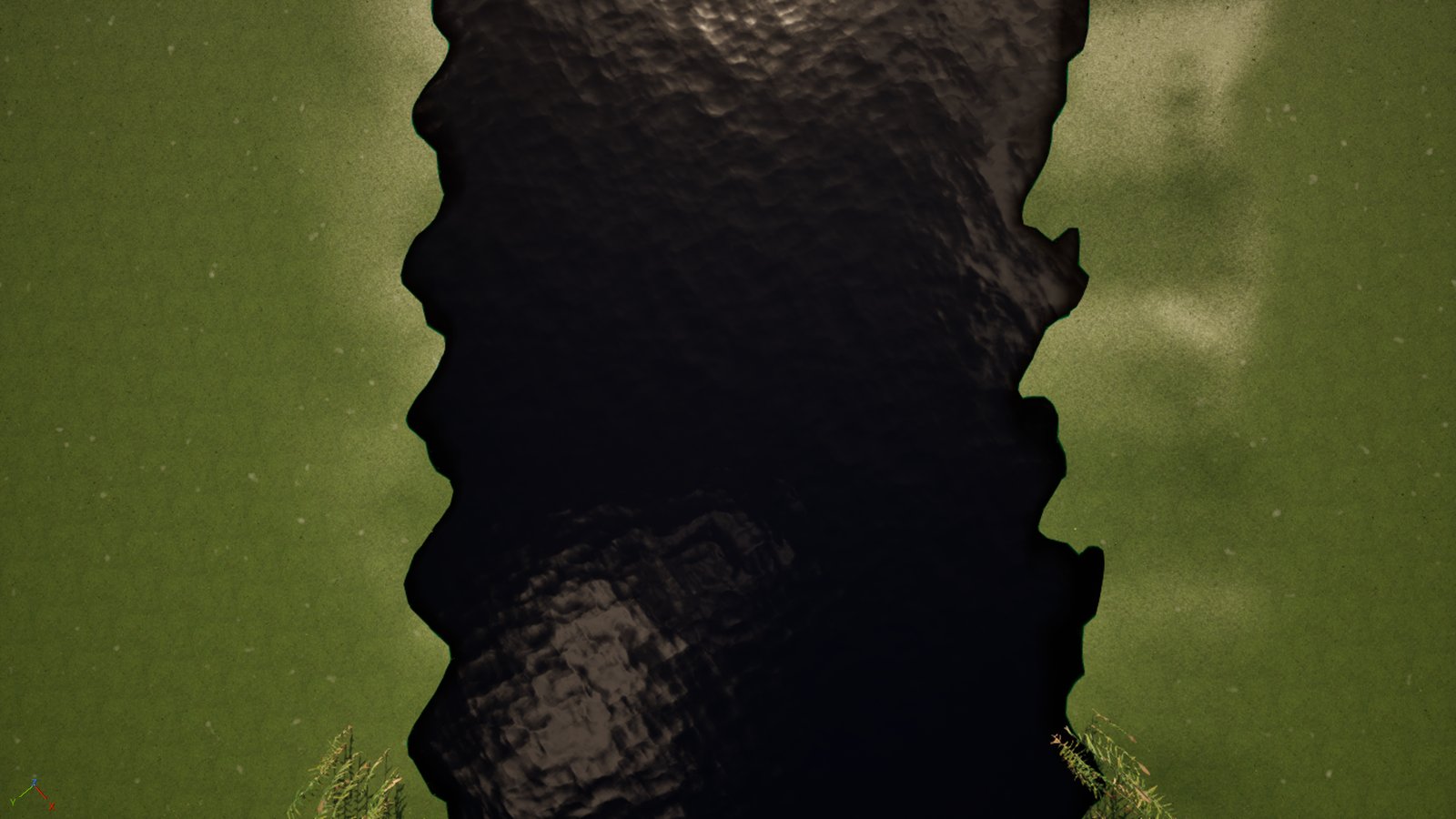
That is the frame the tuning gets judged on. The other three say how it will read to a player; the nadir one says what is actually in the water. Every null result of the previous session had been read off an eye-height frame, which is the one view guaranteed not to answer the question.
One divided by the number you wrote
With a frame that could see the water, the answer took about ten minutes and it was embarrassing.
The master water material was exported and read rather than reasoned about, and the wiring into the Single Layer Water output says:
AbsorptionCoefficients = (1.0 / Absorption.RGB) / Absorption.A
It is a reciprocal. Absorption.RGB multiplied by Absorption.A is not a coefficient at all - it is a mean free path, the distance light travels through the water before it is swallowed, in centimetres. Bigger means clearer.
The shipped values were (0.25, 0.35, 0.90, 8.0). That is light paths of 2.0, 2.8 and 7.2 centimetres. The Oakhaven was opaque within an inch of its own surface. There was no transmitted light to tint, which is why absorption did nothing, why scattering did nothing, why the bed was invisible and why the shallows read as dark as the channel. The only thing on screen was sky, reflected off a surface with a roughness of 0.12.
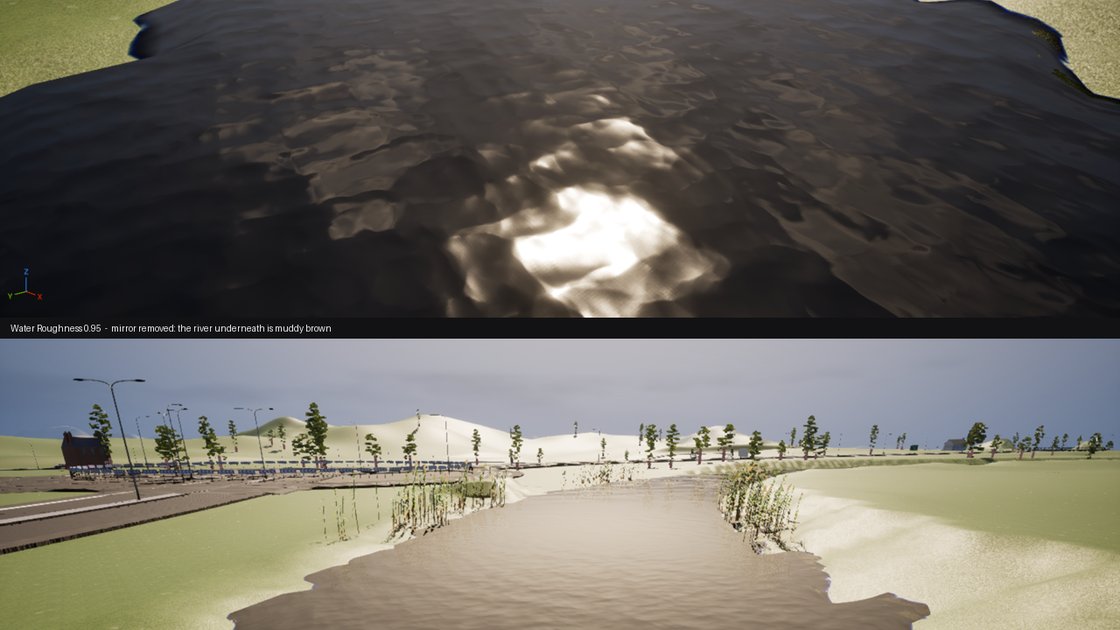
And the strongest single piece of evidence for the previous, wrong diagnosis had been a test that did the exact opposite of what it claimed. Absorption had been driven to 0.001 to make the water clear. One divided by 0.001 is 1,000. That test made the water as opaque as it is possible to make it, reported no change, and was written down as proof that the parameters were orphaned.
For scale: the engine's own default is (10, 150, 350, 8), which is 0.8 metres of red, 12 of green and 28 of blue - red swallowed first, blue last, which is why deep water is blue. Epic's own river material ships sub-centimetre values, opaque on purpose. Neither of those is a Midlands river in flood season.
Fifteen units out of nowhere
One scare before it was over. Two nadir frames shot four minutes apart, with the water parameters identical between them, measured R29 G24 B24 and R13 G12 B17. A fifteen-unit swing from changing nothing at all.
Actors tick in the Unreal editor whether or not the game is running, which means a sun and a cloud rig can move between two captures and an A/B taken across minutes measures the weather instead of the change. So a probe went in to print the sun's rotation and the clock beside every capture - on the assumption that the sun had drifted.
The sun had not drifted. It read pitch −45.0000 and yaw 43.7300, identical two and a half minutes apart. What was moving was the water surface itself, which animates, and the wind in the foliage. Which means a per-pixel difference between two frames is useless and a mean over a calm patch of channel is fine: two control frames taken that way agreed to 0.4 units. The instrument was trustworthy after all, and now it prints its own conditions, which it should have done from the start.
Algae, sewage, and the one that got signed off
Twenty-three eye-height reference shots of the Trent went into the river reference folder at about twenty past eight that evening, and the colour was judged against them rather than against anybody's idea of what a river looks like.
The setting that got signed off is called silt: mean free paths of 0.85, 0.85 and 0.55 metres, scattering of 0.075, 0.085 and 0.06 per metre. Red and green equal with blue suppressed but not killed. Killing blue outright gives mustard. Letting red dominate gives flood-brown. Leaving blue level with the other two gives a swimming pool, which is roughly what most open-world games do with inland water and is the single laziest thing in the genre. GTA 6 is set in Florida and can have whatever colour water it likes. This is a river that runs past a terrace of council houses and a retail park, and it wants to look like one.
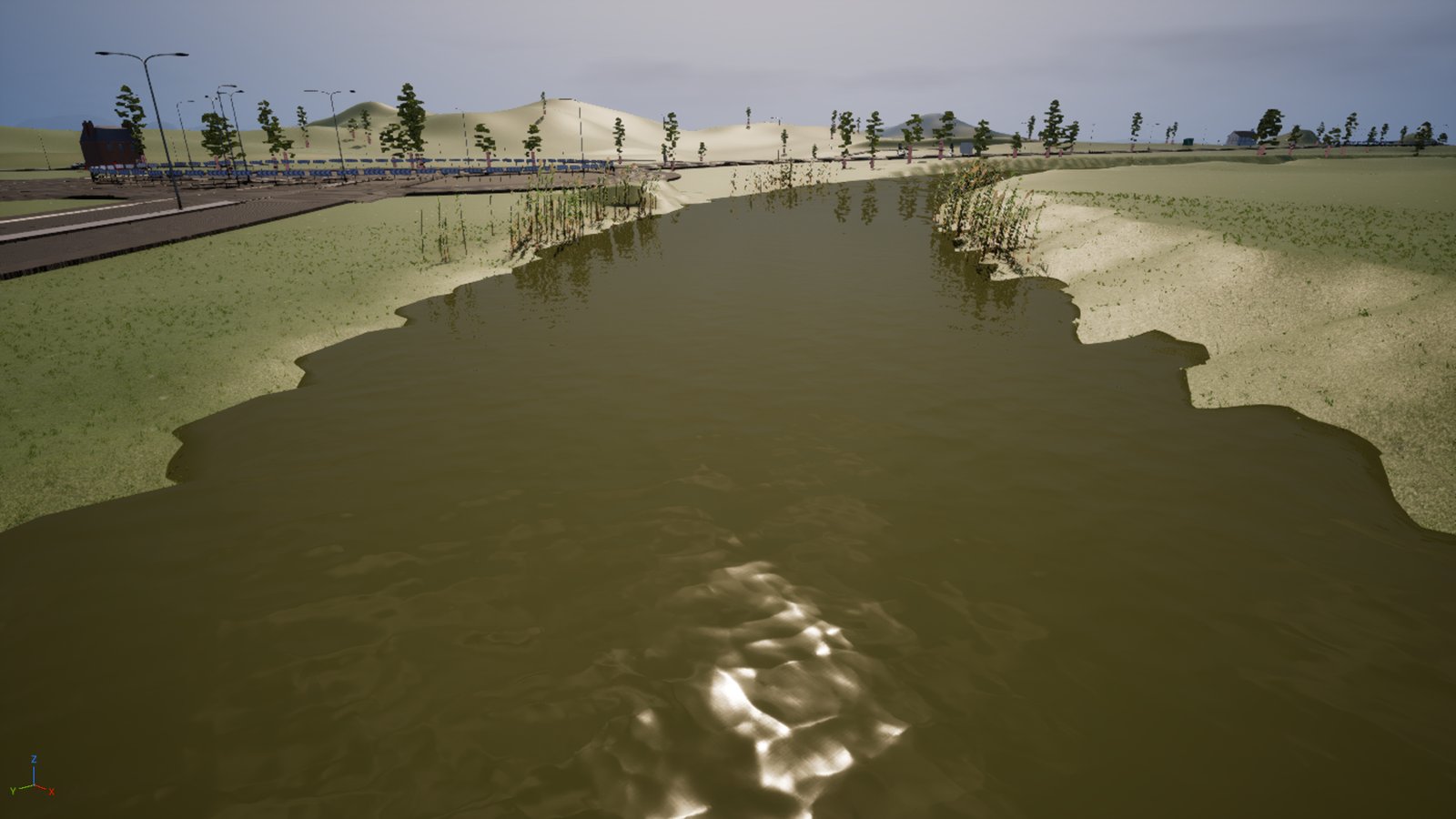
Three more presets came out of the tuning by accident and were kept because James wanted them. algae is a near-clear column under a heavy green bloom, for if the river ever has an outbreak. peasoup is the same olive at double strength, for after heavy rain. And sewage - found while overshooting on red - is a thick orange-brown that reads as a flood or a leak, and is a story beat waiting for a story.
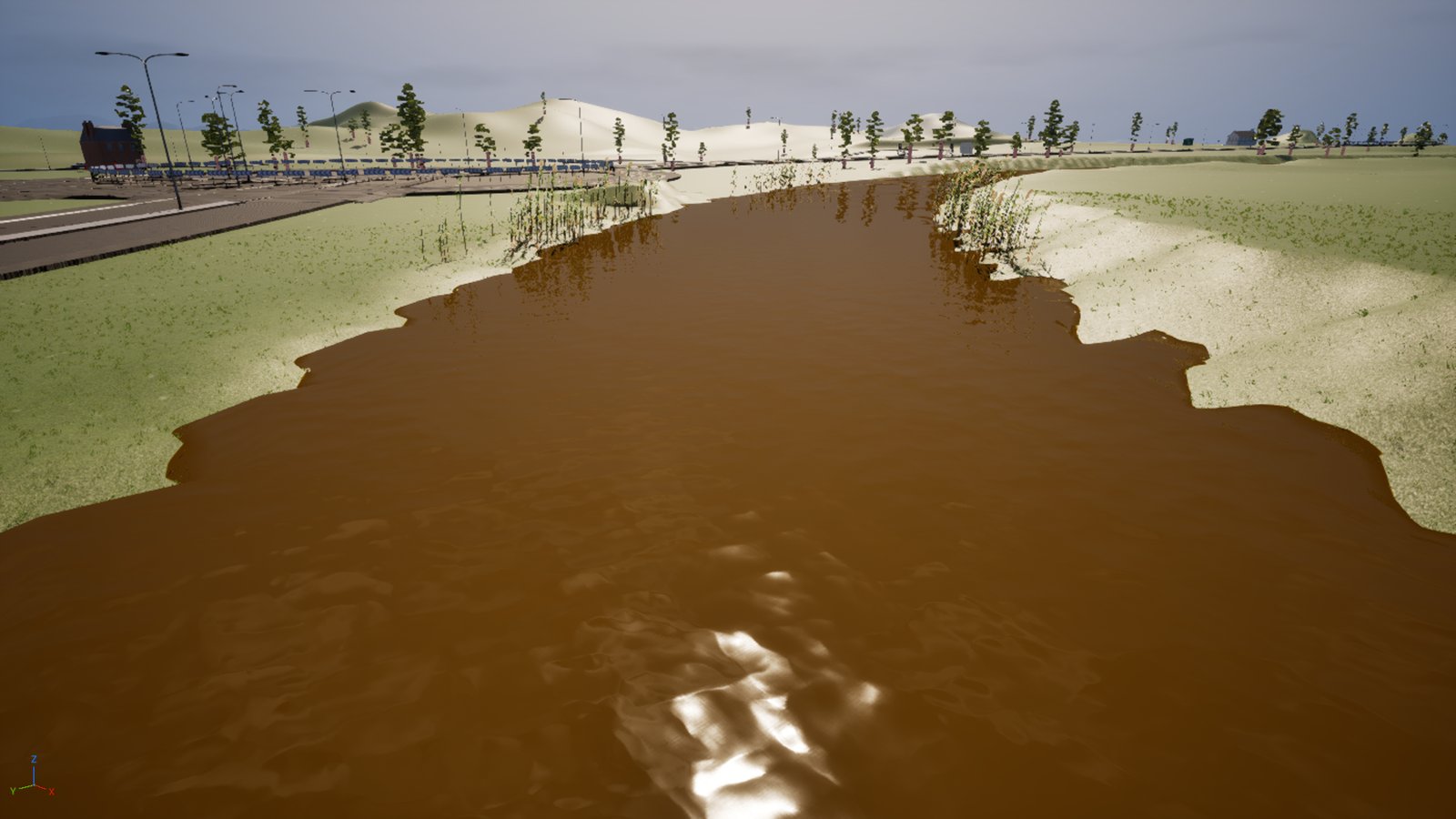
sewage preset, found by overshooting on red and kept. It is not the river's everyday colour and is not meant to be.The water level also came down 20 centimetres across all 381 spline points, in two passes, because it looked like it was about to break its banks. It still does, and that is not a water height problem: measured across the channel, the right bank has a proper berm and the left bank has a low shelf that never reaches a lip inside 25 metres. Any level that fills the channel sheets across the shelf. Getting the water back inside the real banks needs about another 50 centimetres, and 50 centimetres leaves all 3,174 reeds standing on dry land.
James looked at that and stopped rather than acting on it. It was gone one in the morning.
The fault
River water renders black in Unreal Engine 5.8 and changing Absorption or Scattering does nothing
A Single Layer Water body reads near-black with a hard sun glare on it. The bed is invisible, the shallows are as dark as the channel, and editing Absorption or Scattering moves the frame by one or two units. Scattering at a single-scattering albedo of 0.98 on red produces no red. The same values pushed onto the live material instance, bypassing the chain, also produce nothing.
Two causes, and they mask each other:
Absorptionis a reciprocal. The shader computes
AbsorptionCoefficients = (1.0 / Absorption.RGB) / Absorption.A, so RGB × A is a mean free path in centimetres and bigger is clearer. Shipped (0.25, 0.35, 0.90, 8.0) is light paths of 2.0, 2.8 and 7.2 cm: opaque within an inch, with no transmitted light for either parameter to tint. Driving Absorption to 0.001 to "clear the water" makes it maximally opaque (1/0.001 = 1000), and that is the test most likely to be misread as proof the parameters are dead.
- The A/B was judged at eye height, a grazing view. At grazing incidence Fresnel
approaches 1.0, so the frame is nearly pure reflected sky. The navy is the sky at a surface roughness of 0.12, not the water.
The fix
Judge water colour on a nadir frame, and read the master graph before reasoning about its parameters
Capture the same stretch at four fixed angles: eye height, about 20° down, about 45° down, and a nadir frame at about 85° down. Tune against the nadir frame, the only one where Fresnel is weak enough to show the water's own colour, and use the 20° frame to check how it reads to a player on the bank.
Settled values for a silty English river, as mean free path in metres so they read directly: 0.85, 0.85, 0.55 m, scattering 0.075, 0.085, 0.06 per metre. Red and green equal, blue suppressed but not killed.
The guards:
- Export and read the master material graph before reasoning about its parameters. The
arithmetic here was inverted for a whole session because nobody had.
Water Roughness0.12 → 0.95 takes the mirror off in one edit, the fastest way to see what
is underneath it.
- Print the sun rotation and the clock beside every capture. Actors tick in the editor without
the game running, so an A/B taken minutes apart can measure the weather.
- ☠ Editor Python calling into
WaterBodyComponentcrashed the editor twice with
EXCEPTION_ACCESS_VIOLATION. Write the material instance as an ordinary asset and let it propagate; commit spline edits with update_spline() and do not call the rebuild.
The fault
A retargeted skeletal mesh does not render in PIE, and every measurement of it reads back wrong
The actor exists, moves and is not hidden. It just never draws. Measurements disagree between calls: some bounds read plausibly, some read three millimetres, the same actor reads differently twice running.
- The measurements are the first fault.
ONLY_TICK_POSE_WHEN_RENDEREDmeans a mesh that is not
rendering does not evaluate its pose, so socket and bounds reads come back stale or degenerate and look exactly like real data.
- The render fault is two settings. Bone translation retargeting left on
Animation
instead of Skeleton brings translations through verbatim from clips authored for a differently proportioned rig, and the hierarchy collapses: head to back foot 3 mm. And a donor mesh authored in metres carries a root scale of 100 in its reference pose, which the retarget can bake back to 1 in every clip.
- Either alone fails, and differently. Translations only ⇒ still collapsed. Scale only
⇒ a 23-metre animal (bounds 1,089 × 171 × 2,335 cm), and a camera 4 m away renders nothing because it is inside the mesh.
The fix
Force the pose to tick before measuring, then fix translation retargeting and root scale together
Force ALWAYS_TICK_POSE_AND_REFRESH_BONES on the live components before taking a single measurement. It is transient, discarded when play stops, and it made all eight animals measurable at once after hours of contradictory readings.
Then set bone translation retargeting to Skeleton across the whole hierarchy (a recursive call from the root bone), and remove the root scale track from each clip so the bone falls back to the reference pose.
The guards:
- Check translation retargeting on every future donor rig. It was harmless before only
because the old rig and its clips shared proportions.
- Never measure scale from an auto-framed preview capture: a 0.3 cm animal and a correct one
render identically. Pass an explicit camera and A/B against a known-good pose.
- A CDO cannot see Blueprint-added components, so a readback through the class default object
reports them missing when they are present on disk.
The fault
Landscape grass renders the same dry olive in every season and no weather changes it
The grass material's dryness scalar runs 0 (lush) to 1 (straw), and the build script that authored it carries a comment saying the weather manager drives it. It does not. The weather tick writes rain intensity, wind speed and snow accumulation, and nothing in the project writes the dryness value at all - so the asset default is what the player sees, permanently. The default was 0.35, i.e. every blade in the game a third of the way to late-August straw.
The fix
Correct the default, and treat "X drives this" comments in build scripts as unverified
Lower the default to 0.12: one constant, re-runnable, writes a single asset, touches zero landscape proxy packages and causes no shader recompile, because changing a scalar default does not alter shader code.
The guard: this project now has two recorded cases of an intention written into a build script as though it were built (grass dryness, and eight wind parameter collections nothing writes to). Read the graph. The corroborating tell is cheap: the golf capture script sets the dryness by hand and restores it afterwards, which nobody writes if something else is driving it.
☠ The default change stops a bad static value. It does not build the missing seasonal response, and that stays open.
The kit
| Tool | Why this one |
|---|---|
| Unreal Engine 5.8 | where all three faults lived and the only place any of them was visible |
| A material graph export | settled in ten minutes an argument that had run a whole session on inference |
| A four-angle capture rig | the eye-height frame cannot see the water; the nadir one can |
| Twenty-three reference shots of the Trent | the colour was judged against a real river, not a remembered one |
Plain English
| Term | What it means |
|---|---|
| nadir frame | A test shot taken looking almost straight down at a surface. Nadir is the direction pointing directly below you - the opposite of the zenith overhead. It matters for water because a surface seen from a shallow angle is mostly a mirror, so a straight-down frame is the only one that shows the water's own colour instead of the sky's. |
| Fresnel | The rule that a surface gets more mirror-like the more side-on you look at it. Look down into a pond and you see the bottom; look along it and you see the sky. At a grazing angle water reflects almost everything, which is why an eye-height view of a river is nearly blind to whatever colour the water itself has been given. |
| Single Layer Water | Unreal's cheaper water surface - one sheet with a depth-faked body underneath, rather than a simulated volume. It is what makes a river affordable, and it is why the water's colour is set by two numbers rather than by modelling what is actually in the water. |
| absorption and scattering | The two numbers that decide what colour a body of water is. Absorption is light the water swallows; scattering is light it throws back out. Their ratio - the single-scattering albedo - is the actual colour you see, so raising scattering alone does nothing if absorption is raised with it. |
| tuple | A fixed row of numbers written in brackets, where the position of each number is what gives it its meaning. (0.25, 0.35, 0.90) is a colour - red, green, blue, in that order - and a fourth number on the end is usually a strength the first three get multiplied by. The order is the whole convention, so a value in the wrong slot is not an error, just a different colour. |
| material instance | A copy of a material with some settings changed. Cheap to make and cheap to render, so most surfaces are instances rather than originals. |
| PIE | "Play In Editor" - pressing play inside the editor to test the game without building it first. Fast, and it behaves subtly differently from the real build. |
| retargeting | Taking an animation made for one character and making it work on a differently proportioned one. |
| reference pose | The neutral stance a character model is built in, before any animation is applied. Seeing it in a finished shot means the animation is not running at all. |
| skeleton | The hierarchy of bones inside an animated model. Two models sharing a skeleton can share animation. |
| spline | A curved line placed in the level that other things follow - a road, a bus route, a river. |
| CDO | The template a Blueprint stamps out copies from. Editing the template does not always reach the copies already placed in the level, which is a classic silent failure. |
Things we still need to fix tomorrow:
- The river still reads as though it is about to break its banks. The two banks disagree by
2.2 m and it needs another 50 cm of drop, which strands all 3,174 reeds on dry land.
- There is no riverbed material. The bed under the water is still the green grass lawn, and
fixing it will shift the water colour, so the signed-off setting has to be re-judged after.
- Landscape grass still grows on the riverbed and is visible through the surface.
- Rain splashes play on puddles and not on the river.
- Aircraft contrails render black instead of white.
- The grass has no seasonal or weather response at all. Only the bad default was fixed.
- The cat renders. Its behaviour - startle, walk direction, yaw - has still not been watched
for more than a minute.
- The wheelie bin in that frame is floating, and nobody has looked at why yet.
- No video has been cut of any of this.